Geeni
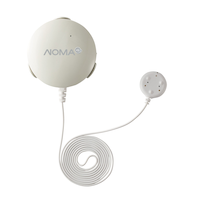
Geeni Smart Wi-Fi Water and Flood Sensor, No Hub Required, White
#046-3275-0
$39.99
Unfortunately, this product is discontinued in your selected store and nearby stores.
You may be interested in these similar products shown below.Similar Items



Quebec residents: For information on maintenance and repair click here.
Product Details
Get notified when there's a minor leak or major flood with the Geeni Water and Flood Sensor
Allows you to set up automated actions with other Geeni smartphone products, such as automatically powering off appliances, if water is detected
Easy to use - simply leave the sensor in the desired location or use included screws/screw holders or adhesive
Protection grade: IP67
Standby time: 5 years
| Part Number | GNCSS003199 |
|---|---|
| Accessories List | No Accessories Included |
| Advanced Features | No Advanced Features |
| Assembled Height (cm) | 6.68 cm |
| Assembled Height (ft) | 0.22 ft |
| Assembled Height (in) | 2.63 in |
| Assembled Length (cm) | 6.35 cm |
| Assembled Length (ft) | 0.21 ft |
| Assembled Length (in) | 2.50 in |
| Assembled Weight (kg) | 0.07 kg |
| Assembled Weight (lb) | 0.15 lb |
|---|---|
| Assembled Width (cm) | 2.54 cm |
| Assembled Width (in) | 1.00 in |
| Assembled Width (mm) | 25.40 mm |
| Batteries Required Quantity | 1 |
| Battery Technology | Lithium-Ion |
| Battery Type/Battery Size | Integrated Rechargeable |
| Certifications | CE Certified |
| Consumer Pack Size | 1 |
| Home Security System Type | Alarm Sensors |
| Horizontal Sensing Angle (degree) | 0 ° |
| Maximum Number of Remote Controls | 0 |
| Maximum Operating Humidity | 90 |
| Maximum Operating Temperature (°C) | 50.00 °C |
| Maximum Operating Temperature (°F) | 122.00 °F |
| Minimum Operating Temperature (°C) | -20.00 °C |
| Minimum Operating Temperature (°F) | -4.00 °F |
| Monitoring Connection Type | Wi-Fi/Internet |
| Non-toxic When Used as Intended | Yes |
| Package Depth (cm) | 5.00 cm |
| Package Depth (in) | 1.97 in |
| Package Height (cm) | 13.41 cm |
| Package Height (in) | 5.28 in |
| Package Weight (kg) | 0.29 kg |
| Package Weight (lb) | 0.64 lb |
| Package Width (cm) | 8.99 cm |
| Package Width (in) | 3.54 in |
| Power Source(s) | Battery |
| Primary Material | ABS Plastic |
| Product Use(s) | Indoor |
| Radio Frequency Band | 315 MHz |
| Range (ft) | 29.53 ft |
| Range (m) | 9.00 m |
| Siren Amperage (a) | 0 A |
| Siren Volume (db) | 0 dB |
| Smart System Compatibility | Android App, iOS App, Wi-Fi |
| Standby Amperage (a) | 13 A |
| Vertical Sensing Angle (degree) | 0 ° |
| Voltage (V) | 3 V |
| Wattage | 0 W |
Warranty
- This product carries a 1 year exchange warranty redeemable at any Canadian Tire store.
Online Ordering
- Pick Up is free at most stores (some stores require a minimum order value before tax)
- Shipping fee is based on size and weight of products and distance from address to store
- Same-Day Delivery costs $9.99 per order
- Online Ordering Information
Returns
- Most products can be returned or exchanged at any Canadian Tire store within 90 days of purchase
- Some products are non-refundable and non-exchangeable
- The return policy outlined above may not apply to the product you are currently viewing. For complete details and eligibility, please refer to our Return Policy for exceptions.
Compare Similar Products
Only Show Differences | ||||||
| Ratings | ||||||
| Accessories List | No Accessories Included | Batteries Included | Batteries Included | Batteries Included, Manual | Batteries Included | |
| Advanced Features | No Advanced Features | No Installation Required | No Advanced Features | No Advanced Features | WIFI, Temperature Sensor, Low Battery Indicator, Continuous Duty, Automatic Calibration | |
| Assembled Height (cm) | 6.68 cm |


Shop Related Products
- Weekly Deals
- Customers Also Viewed
- Top Trending Products
- More From This Brand
Weekly Deals





Review Highlights
List of Pros Highlights
Pros
List of Cons Highlights
Cons
Reviews
Customer Images and Videos
Filter Reviews
- use with app
- purchase
- returns
- wifi
- setup
- installation
- battery
- connections
Rating
Locale
1 to 5 of 53 Reviews
1 – 5 of 53 Reviews
Most Recent
1 out of 5 stars.
No notification when water is detected
2 months ago
Device would not send notifications to my iPhone 14 when water was detected. When I called Geeni support I was pleased that they answered almost immediately. Unfortunately they repeatedly asked me to check the same basic things on the call and subsequent emails. Yes, my iOS is up to date and notification permission is on for the app. No other apps have a problem with notifications on my phone. I returned the sensor for a refund.
Helpful?
Response from Merkury official response:
2 months ago
Merkury official response
We’re sorry to hear about the issue you experienced with your water sensor notifications and appreciate you taking the time to share your feedback. We’re glad our support team was responsive, and we’ll use your comments to improve our troubleshooting process moving forward.We can provide troubleshooting steps regarding notifications. You may reach us at +1 (888) 232-3143 at your earliest convenience or contact us through our website at https://support.merkurysmart.com/hc/en-us. We look forward to assisting you.

1 out of 5 stars.
Must be logged in to work
a year ago
As another person reported, for some reson the app logged me out and because of this, my wife was walking in water before we knew there was a leak! Not recommended. My advice is to either make it so the app doesn't log you out automatically or better yet, not require a log in at all!!
Helpful?
Response from Geeni official response:
a year ago
Geeni official response
Hi, we are very sorry for the trouble. We want to get to the bottom of this. Were you able to report the issue to our Support Team already? If not yet, kindly do so. Please send us video of the concern, so we can better understand what happened. Anyhow, your sensor is within warranty so if the product is deemed defective, we can definitely replace it. For more information and self-help articles, you may visit our support website by clicking this link support@mygeeni.com. For immediate assistance, you can reach us through our chat support platform. We are open every day from 10 AM to 7 PM EST.
1 out of 5 stars.
VERY unreliable DO NOT BUY
a year ago
Only works if you are logged in, and for whatever reason, it does not stay logged in. VERY unreliable
Helpful?
Response from Geeni official response:
a year ago
Geeni official response
Hello Lisa, Thank you for the honest feedback. Please Please Make sure you’re connected to a 2.4GHz Wi-Fi network (Geeni can’t connect to 5GHz networks) and it is 10 to 20 feet away from the router. We would like the opportunity to assist you with this further so we can resolve this. Rest assured, we stand by our warranty process if the proven product is defective. Please give us a call at +1 (888) 232-3143 at your earliest convenience. Our team is available daily from 10 AM to 7 PM EST. You can also reach us through our website at https://mygeeni.com/support/. Looking forward to assisting you.
5 out of 5 stars.
Geeni Smart Wi-Fi Water and Flood Sensor
a year ago
Super easy setup. Hopefully they will never have to be used.
Helpful?
2 out of 5 stars.
plan to buy ,
a year ago
after seeing all not satisfied reviews, it is better to stay away from this little thing.
No, I do not recommend this product.
Helpful?
Response from Geeni official response:
a year ago
Geeni official response
Hi Alen, Thank you for your interest in our Flood Sensor. We understand that you may have concerns about the reviews, but we can assure you that customer satisfaction is our top priority. All feedback is very valuable to us, and we encourage customers to reach out to us directly with any questions or concerns they may have. We have a dedicated team to provide assistance.
1 – 5 of 53 Reviews
Questions
Start typing your question and we'll check if it was already asked and answered.
1 - 10 of 14 Questions
Most helpful answers
Q: Does the Geeni Water & Flood' sensor send a 'low battery' warning through the app indicating that it needs to be replaced??
3 years ago4 Answers
A: Hello Mario, I am glad you raised this over to us. To answer your question yes, you will be notified if you need to change the battery. The battery that this sensor use is CR2-3V.. For more details, please call us at +1 (888) 232-3143 or send us an email at support@mygeeni.com. You may also visit our support website support.mygeeni.com for live chat support. We are available from Mon-Sun from 10:00 AM to 7:00 PM EST.
3 years agoHelpful?

Q: Does the unit come with battery ? What is the replacement battery type?
4 years ago3 Answers
A: Hello Marc! Thank you for your interest in our smart devices. To answer your question, yes it does come with a battery. This is the replacement battery type CR2 lithium 3.0 volt A . For more details, please call us at +1 (888) 232-3143 or send us an email at support@mygeeni.com. You may also visit our support website support.mygeeni.com for live chat support. We are available from Mon-Sun from 09:00 AM to 12:00 MN EST.
4 years agoHelpful?
Q: Is the small part on the end the part that detects water? Does it make a beeping noise to alert you?do you need to use the app for it to work? Once you dry it off does the alarm stop or can it be reset?
4 years ago3 Answers
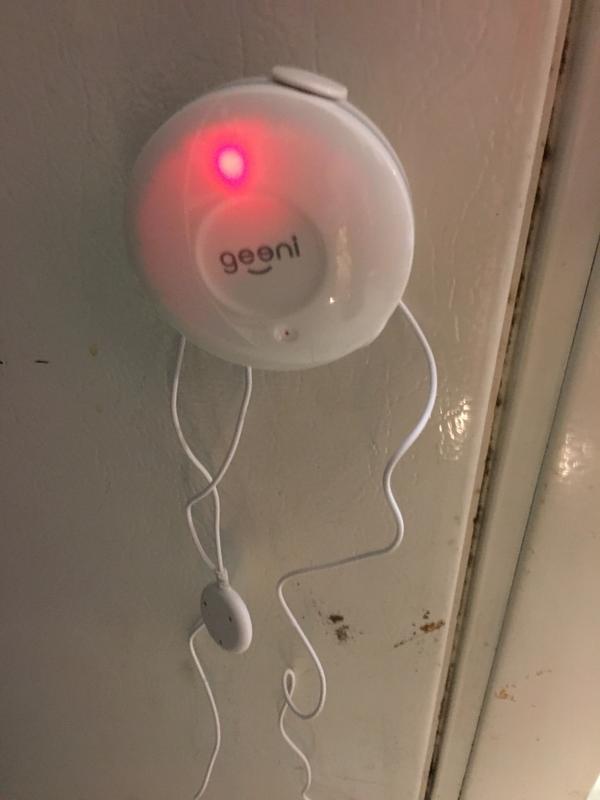
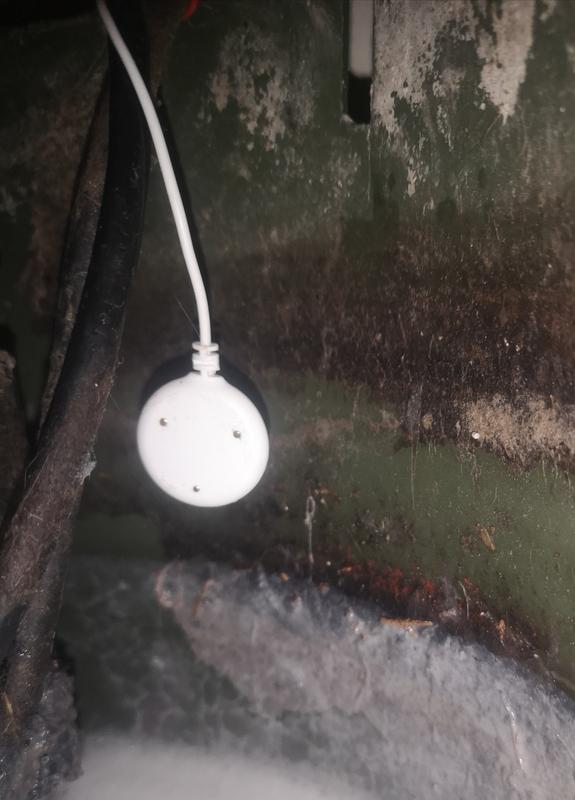
A: The small disc with the three metal dots is the sensor end. Either side will trigger the alarm. It’s not super loud, so I did connect it to the app to alert on my phone. When removed from the water/dry it stops alarming. Will alarm automatically when wet again. The disc should be flat if possible as the water needs to touch more than one dot.
4 years agoHelpful?
Q: Does this need to be mounted flat on the floor or can I mount it sideways inside my sump pit near the top to notify me before my basement floor gets wet? And will the humidity in the sump pit set it off, or does this only get set off by water touching it?
4 years ago3 Answers
A: Hello! Thank you for your interest in our smart devices. To answer your question, we would like the opportunity to discuss this with you, please call us at +1 (888) 232-3143 or send us an email at support@mygeeni.com. You may also visit our support website support.mygeeni.com for live chat support. We are available from Mon-Sun from 10:00 AM to 7:00 PM EST.
4 years agoHelpful?
Q: Does this sensor require a hub or other accessories to connect to my wifi?
4 years ago2 Answers
A: Hello Laura, thank you for your inquiry about one of our products, To answer your question, no. All Geeni devices are designed to only work for 2.4 GHz for a wider range, unlike 5 GHz that cannot penetrate walls and floors. Since most routers nowadays are dual-band, we can ask your Internet Service Provider to separate the two networks (2.4 GHz and 5 GHz) for them to have different SSID so you can connect your device to 2.4 GHz networks. Anyhow, we want to help you with this so please contact us via email at support@mygeeni.com, phone +1 (888) 232-3143, support.mygeeni.com for online chat support as soon as you are able so we can resolve this. We are available from Mon-Sun, 10:00 AM to 7:00 PM EST.
4 years agoHelpful?
Q: How close to the floor should we install the sensor?
4 years ago1 Answer
- Translate with Google
A: Hello Blue, thank you for bringing this to our attention. It really depends where you want to place the water and flood sensor. You should not put your smart sensor in a wet area because it will frequently notify you once the gold plated sensor touched any wet surface. For more details, please contact us at +1 (888) 232-3143 or send us an email support@mygeeni.com. You can also visit our support website support.mygeeni.com for online chat support. We are available from Mon-Sun, 9:00 AM to 12:00 Midnight EST.
4 years agoHelpful?
Q: Dose the unit beep or dose it just send a message on your phone
4 years ago1 Answer
A: Hello Minnie, thank you for your interest in on e of our product. For the Geeni notification, it is not a message directly to your number but it will notify you via the Geeni application. You just need to enable the App message notification on the settings of the Geeni application for you to have it pop up to your phone notification. if you want to be alerted by the device, you can purchase as well the Geeni Siren. For more details, please contact us at +1 (888) 232-3143 or send us an email support@mygeeni.com. You can also visit our support website support.mygeeni.com for online chat support. We are available from Mon-Sun, 9:00 AM to 12:00 Midnight EST.
4 years agoHelpful?
Q: When buying this sensor is the battery included
5 years ago1 Answer
A: Thank you for your interest in one of our products. To answer your question, no. The smart sensor is battery operated and the battery is not included in the box. The type of battery needed is CR2-3V x 1. If you have any issues moving forward, please contact us via email at support@mygeeni.com or call us at +1 (888) 232-3143, available from Mon-Sun, 9:00 AM to 12:00 Midnight EST.
5 years agoHelpful?
Q: Is it compatible with IFTTT?
5 years ago1 Answer
A: Hello Jacob, thank you for your interest in one of our products. As of the moment IFTTT is still in the works with our developers. A similar request has already been submitted and hopefully it will be included in the next app updates. For more details, please contact us at +1 (888) 232-3143 or send us an email at support@mygeeni.com. You may also visit our support website support.mygeeni.com for live chat support. We are available from Mon-Sun 9:00 AM to 6:00 PM EST.
5 years agoHelpful?
Q: Can the batteries can be changed
5 years ago1 Answer
A: Thank you for your interest in one of our products. To answer your question, yes, the batteries can be changed. The battery type is CR2-3V, you can visit this link for additional information https://mygeeni.com/collections/smart-sensors/products/wi-fi-smart-water-and-flood-sensor-white. For more details, you can reach us at +1 (888) 232-3143 or send an email to support@mygeeni.com. You can also visit our website support.mygeeni.com for online chat support. We are available from Mon-Sun, 9:00 AM to 6:00 PM EST.
5 years agoHelpful?
1 - 10 of 14 Questions